Youtube Playlist Length Calculator
Master your time. Get precise duration analytics for any YouTube playlist instantly. Paste playlist URL to get instant result on how long it takes to watch all the videos in one go.
Simple Process,
Powerful Results
We've streamlined the process to make it as effortless as possible. No sign-ups, no complex steps. Just insights.
Copy URL
Copy the link of any YouTube playlist you want to analyze.
Paste & Calculate
Paste it into our tool and hit the calculate button.
Get Insights
View detailed duration breakdowns and planning tools.
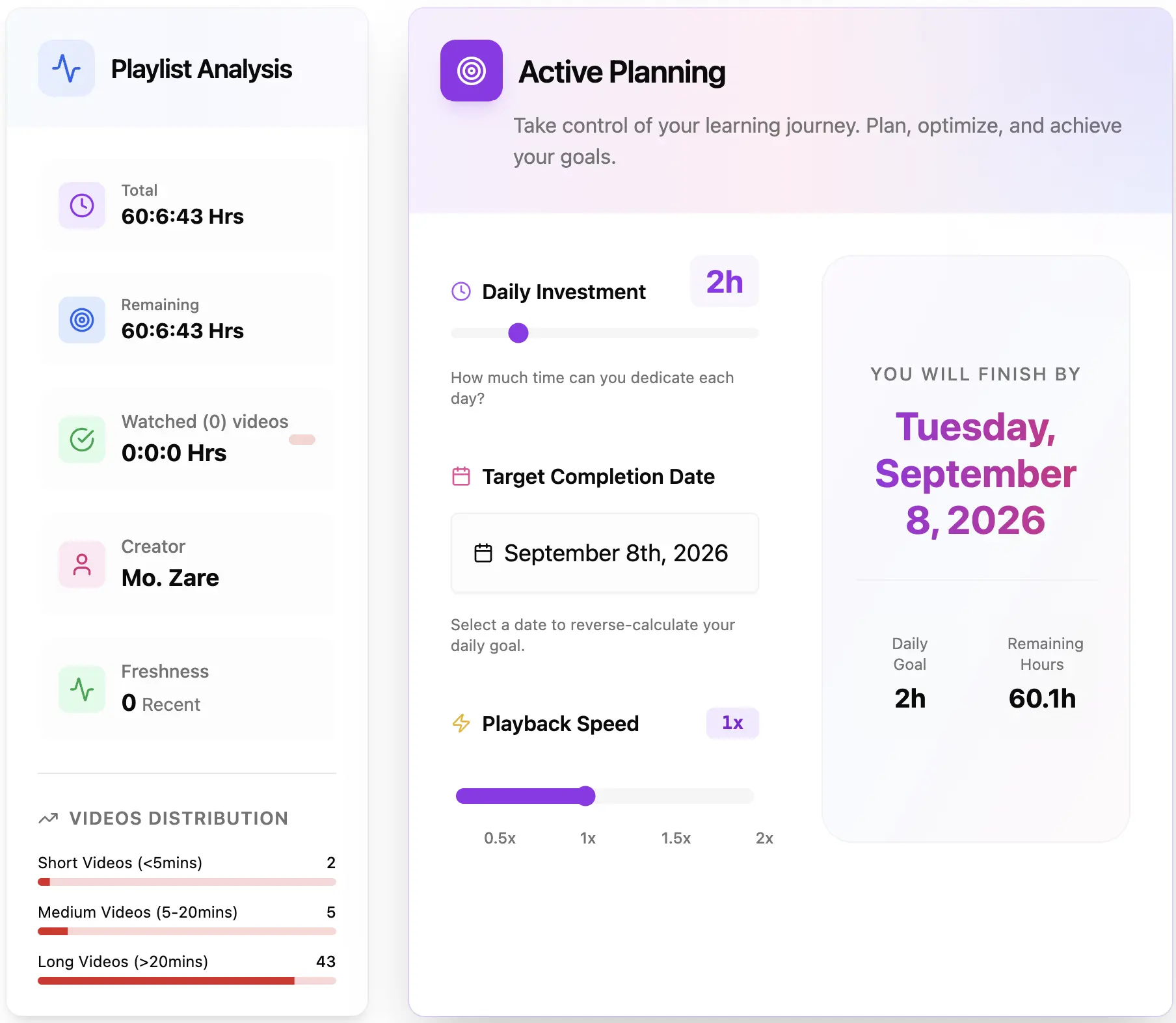
Visualize your playlist timeline and plan every session with precision.
How We Calculate
Transparency is key. Here's the math behind our precise duration and time-saving calculations.
Total Duration
(Hours × 3600) + (Minutes × 60) + Seconds
Playback Speed Adjustment
Original Duration / Playback Speed
Time Saved
Original Duration - New Duration
Real-world Example
For a 2h 30m playlist at 1.5x speed:
Everything You Need to Calculate Playlist Time
A powerful YouTube playlist length calculator — completely free, with every feature you need to plan your watching.
Multiple Playlists Support
Calculate several YouTube playlist lengths at once. Paste a few links and get the combined total duration for all of them in a single view.
Video Range Calculator
Measure only a specific slice of a playlist. Perfect for planning study sessions, course modules, or rewatching a middle section.
Playback Speed Calculator
See watch time at 1.25x, 1.5x, 1.75x and 2x. Plan exactly how fast you can finish a playlist without guessing.
Single Video Duration
Works with individual YouTube videos too. Get the duration and speed-adjusted watch time for any video, not just playlists.
Daily Watch Planner
Set your daily watch time and playback speed to see how many days it takes to finish. Ideal for online courses and study schedules.
Export to Excel
Download playlist data as a spreadsheet with video titles, channels, durations and clickable YouTube links for your own planning.
Playlist Length Calculator Speed Comparison
See how much time you save by watching at different speeds with our playlist length calculator.
| Original Duration | 1.25x | 1.5x | 1.75x | 2x |
|---|---|---|---|---|
| 1 hour | 48 min | 40 min | 34 min | 30 min |
| 5 hours | 4h | 3h 20m | 2h 51m | 2h 30m |
| 10 hours | 8h | 6h 40m | 5h 43m | 5h |
| 20 hours | 16h | 13h 20m | 11h 26m | 10h |
| 50 hours | 40h | 33h 20m | 28h 34m | 25h |
At 2x speed you save 50% of your viewing time. A 50-hour course becomes just 25 hours — use our playlist length calculator to plan it precisely.
Common Use Cases for Playlist Length Calculator
Real scenarios where knowing your playlist length makes a difference in daily planning.
Online Course Planning
Found a free programming course with 150 videos? Get the total duration — a 45-hour course at 2x speed is about 22.5 hours of real watching.
Music Playlist Duration
Building a workout or road-trip mix? See the exact runtime so you always have enough music — a 3-hour playlist fits a long drive perfectly.
Binge-Watching Planning
Want to finish a documentary series this weekend? If it is 12 hours, plan 6 hours a day or watch at 1.5x to wrap up sooner.
Exam Preparation
Your professor shared review lectures and exams are in 5 days. Check the total time, divide by your available study hours, and build a realistic schedule.
Partial Playlist Calculation
Already watched the first 30 of a 100-video playlist? Calculate only videos 31 to 100 and know exactly how much time remains.
YouTube Content Research & Comparison
Research competitor playlists or analyze content gaps in your niche. Compare total watch time across multiple YouTube channels to benchmark your own content strategy.
Who Uses the YouTube Playlist Length Calculator?
Students, educators, content creators and anyone who wants to manage their YouTube viewing time effectively.
Students & Online Learners
Estimate study time before starting a new course and know precisely how many hours you need to dedicate.
Teachers & Educators
Provide accurate time estimates when assigning video homework so students can plan their sessions effectively.
Content Creators
Analyze your own playlists or compare with competitors to understand how much content you offer viewers.
Entertainment Enthusiasts
Plan a binge session, commute mix or weekend marathon and see exactly how long your favorite playlist will take.
Why Use a YouTube Playlist Length Calculator?
YouTube doesn't show total playlist duration. Our calculator solves this problem instantly — so you can plan your time with confidence.
The Problem: YouTube Doesn't Show Total Playlist Time
Have you ever found a YouTube playlist for an online course, tutorial series, or music collection and wondered: “How long will this take to watch?” Unfortunately, YouTube only shows the number of videos in a playlist — not the total duration. This makes it nearly impossible to plan your viewing schedule or estimate how much time you need to complete a course before a deadline.
Our YouTube Playlist Length Calculator solves this problem by instantly calculating the total duration of any playlist. Simply paste the URL, and you'll know exactly how many hours, minutes, and seconds of content you're looking at — no manual adding required.
Save Time with Playback Speed Calculations
Most people don't watch videos at normal speed anymore. If you're a student trying to get through lecture videos quickly, or someone who prefers faster playback, knowing the actual watch time at different speeds is crucial for planning. Our playlist time calculator shows you exactly how long it takes to finish a playlist at every common playback rate:
1.25x speed
Save 20% of your time while maintaining good comprehension
1.5x speed
Cut viewing time by one-third, ideal for review sessions and familiar topics
1.75x speed
For experienced speed-watchers who want maximum efficiency without losing context
2x speed
Finish in half the time — perfect for rewatching familiar content or skimming known material
For example, a 10-hour playlist becomes just 5 hours at 2x speed. That's a significant time saving when you're trying to complete an online course before a deadline, catch up on a long tutorial series over a weekend, or fit a music mix into your commute. Our calculator shows these numbers instantly so you can make informed decisions about how to allocate your viewing time.
Plan Your Learning Schedule Effectively
Whether you're studying for an exam, learning a new skill, or planning your entertainment time, knowing the exact playlist duration helps you take control of your schedule instead of guessing. Here is what our calculator enables you to do:
Set realistic daily or weekly viewing goals
Break down a 40-hour course into manageable 2-hour daily sessions across three weeks.
Estimate when you'll complete a course or series
Know your finish date upfront so you can plan around exams, work deadlines, or travel.
Decide if a playlist fits your available time
Quickly determine whether a 25-hour tutorial fits into your free weekend or needs to wait.
Track your progress through long playlists
Use partial range calculation to measure remaining time after you've already watched the first batch.
Compare different courses by total time commitment
Choose between competing tutorials based on actual content hours, not just video count.
Optimize playback speed per difficulty level
Watch introductory material at 2x and complex topics at 1.25x — calculate the blended total.
Helpful Guides & Calculators
Step-by-step guides to get the most out of playlist length planning.
How to Calculate YouTube Playlist Length
Paste a URL and read total hours, minutes and seconds in seconds.
Read guideYouTube Playback Speed & Watch Time
See how 1.25x–2x changes your total watch time.
Read guidePlan an Online Course Playlist Schedule
Turn a long course into a daily study plan.
Read guideCalculate Partial Playlist Duration
Measure only the videos you haven't watched yet.
Read guideFrequently Asked Questions
What is the YouTube Playlist Length Calculator?
The YouTube Playlist Length Calculator is a free online tool that calculates the total duration of any YouTube playlist. Simply paste a playlist URL and get instant results with detailed analytics including total time, video count, and viewing estimates at different playback speeds.
What formats does the total duration display?
The total duration is displayed in multiple formats for your convenience: hours, minutes, and seconds (HH:MM:SS), total minutes, total hours, and estimated viewing time in days, work days, and sessions. You can also see duration estimates at different playback speeds (0.25x to 2x).
Does the calculator work with individual video links?
No, this tool is specifically designed for YouTube playlists. For individual videos, you can see the duration directly on YouTube. However, you can create a playlist with a single video if you need to use our advanced analytics features.
Is there a limit to the number of videos in a playlist?
There's no limit imposed by our tool. We can calculate playlists with thousands of videos. However, very large playlists (1000+ videos) may take a few extra seconds to process as we fetch data for each video to ensure accuracy.
What if the playlist is empty?
If you submit an empty playlist or a playlist with no accessible videos, the tool will display a message indicating that no videos were found. Make sure the playlist is public and contains videos, or check if the playlist URL is correct.
Is my data safe when using the tool?
Absolutely! We only process the playlist URL you provide and don't store any personal information. All calculations are performed in real-time, and we don't save your playlist data or viewing history. Your privacy is our priority.
What if I encounter an error when calculating?
If you encounter an error, first check that the playlist URL is correct and the playlist is public. Common issues include private playlists, deleted playlists, or invalid URLs. If the problem persists, try refreshing the page or contact us through the contact page.
Can I share the calculated duration?
Yes! Once the results are generated, you can easily copy the information and share it with others. The results include comprehensive details that you can screenshot or copy-paste to share the playlist duration and analytics with friends, colleagues, or students.
Why would I want to calculate playlist length?
Knowing the total length helps you plan your time effectively. Whether you're a student with a lecture playlist, a binge-watcher, or a creator analyzing competitors, our tool gives you the exact time commitment required so you can schedule your viewing sessions efficiently.
Can I exclude certain videos from the calculation?
Yes! Once the playlist is loaded, you'll see a list of all videos. You can simply uncheck any videos you've already watched or don't want to include, and the total duration will update instantly to reflect your selection.
Does this work with private playlists?
No, due to YouTube's privacy policies, we cannot access private playlists. However, you can use it with 'Unlisted' playlists if you have the direct link. If you own the private playlist, you can temporarily set it to 'Unlisted' to calculate the length.
What if a playlist has unavailable videos?
Our tool automatically detects and flags unavailable (deleted or private) videos within a public playlist. While we can't get their exact duration, we alert you to their presence so you know the calculation only includes the currently playable content.
Can I use this for my own playlists?
Absolutely! As long as your playlist is set to 'Public' or 'Unlisted', you can use this tool to analyze your own content duration, which is great for planning course modules or video series length.
Does this work with YouTube Music playlists?
Yes, YouTube Music playlists work perfectly with our calculator since they share the same underlying infrastructure as regular YouTube playlists. Just paste the playlist URL to see the total listening time.
How often is the data updated?
We fetch fresh data directly from YouTube every time you click 'Analyze'. This ensures you always get the most up-to-date information, including recent video additions or duration changes.
Who can benefit from using this tool?
This tool is perfect for students planning study sessions, educators organizing course content, content creators managing video series, researchers analyzing video content, and anyone who wants to know how much time they'll need to watch a YouTube playlist before starting.
Why Choose Us?
Powerful features designed to help you manage your content consumption efficiently.
Precision Timing
Get exact duration calculations down to the second for any playlist size.
Smart Planning
Calculate exactly how long it will take to watch at different playback speeds.
Instant Analysis
No waiting time. Get comprehensive insights about your playlist immediately.
Other Youtube Playlist Tools
Enhance your YouTube experience with our suite of powerful playlist management tools.
YouTube Playlist Exporter
Export your YouTube playlists to Excel, CSV, or JSON. Backup your data and analyze content offline with ease.
Youtube Playlist Randomizer
Shuffle your YouTube playlists for a new viewing experience. Break free from the default order and discover videos in a fresh way.
Latest Posts
Check out our latest articles and tutorials
.webp&w=3840&q=75)
How to Shuffle YouTube Playlists (2026 Update): What’s New in Randomizer V1.4.5
Stop settling for 'fake shuffle.' Discover how our latest V1.4.5 update brings true mathematical randomness, persistent sorting, and privacy-first design to your YouTube listening experience.
Read more
How to Search a Video Inside a YouTube Playlist: V1.4.4 New Version Release!
Struggling to find a specific video in a massive YouTube playlist? You're not alone. Discover how our latest V1.4.4 update solves this 8-year-old problem with instant playlist searching.
Read more
Conquer the 46-Hour Marathon: How to Master Your Time and Finish the World's Most Popular YouTube Playlist
A strategic guide to navigating the 500+ videos that define internet culture. Learn how to use our calculator and active planning to finish the 'Most Viewed' playlist.
Read moreLatest Updates
We're constantly improving. Check out the latest features and enhancements.
v1.4.6
Guides Hub, Richer Homepage & Content Authenticity
- 📚 NEW: Launched the Guides hub with 8 in-depth articles on playlist length, playback speed, course planning, partial durations, music runtimes, reverse planning, and how the calculator works
- 🖼 Each guide now has a unique, topic-themed cover illustration (no more repeated images across articles)
- ❓ Expanded FAQ sections across all guides to 7–8 questions each for clearer, more complete answers
- + 3 more updates...
v1.4.5
Ecosystem Expansion & User Experience Polish
- 🚀 NEW: Added Other Playlist Tools section on homepage for better discovery
- 🔀 NEW: Integrated quick access to Playlist Randomizer directly in video results
- ✨ Enhanced SEO coverage for all tool pages in sitemap
- + 2 more updates...
v1.4.4
UI Unification, New Features & Navigation
- 🎨 UI Unification: Standardized inputs with modern 'Capsule' design & glassmorphism
- ⚡️ Speed Slider: Interactive gradient slider for precise playback control (0.25x - 2x)
- 🔍 Video Search: Real-time keyword filtering for playlist videos
- + 5 more updates...